



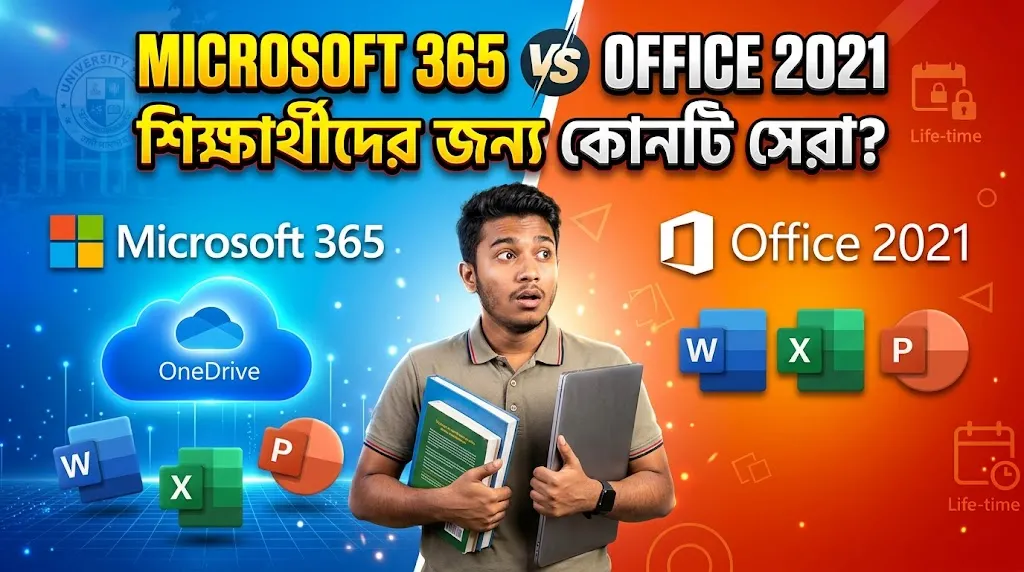

Microsoft 365 is the better choice for most students in Bangladesh in 2026. You get regularly updated Word, Excel and PowerPoint apps, cloud storage on eligible plans, and tools for working on assignments across devices. Office 2021 is no longer a good new purchase for most students because Microsoft ended its support on October 13, 2026. It can still open files, but it no longer receives security fixes.
If you study at a college or university in Dhaka, Chattogram, Rajshahi or anywhere in Bangladesh, your choice should depend on how you prepare assignments, share group projects and store class files—not only the purchase price.
Before spending any money, also check whether your educational institution gives you Microsoft 365 Education for free. Some eligible students can use the web versions of Word, Excel and PowerPoint without paying separately.
Explore Microsoft 365 subscriptions at Tech Haat.
Updated: November 4, 2026. Features and local reseller packages can change.
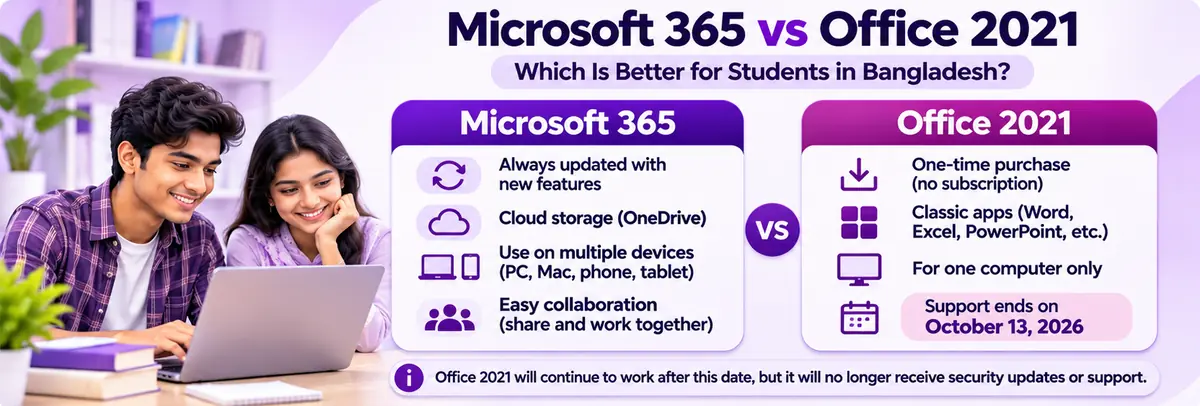
Image: A quick comparison of Microsoft 365 and Office 2021. Office 2021 support has already ended.
Microsoft 365 vs Office 2021: Quick Comparison for Students
| What matters to students | Microsoft 365 (eligible Personal/Family plan) | Office 2021 (one-time desktop edition) |
|---|---|---|
| Payment | Subscription; renew to keep paid benefits | One-time purchase for that edition |
| Microsoft Word, Excel, PowerPoint | Current desktop apps | Classic 2021 desktop apps |
| Security updates | Provided while the subscription and supported configuration remain current | Ended October 13, 2026 |
| OneDrive storage | Typically 1 TB with Personal; confirm your package | No OneDrive storage included with the license |
| Device access | Works across supported PCs, Macs, tablets and phones | Usually licensed for one PC or Mac, depending on edition |
| Real-time group work | Cloud collaboration through eligible services | More limited; no Microsoft 365 service entitlement included |
| Internet | Needed for activation and periodic checks; desktop apps can work offline | Can work offline after activation |
| Best fit today | Most students needing updated apps and cloud work | Existing owners only; not recommended as a fresh purchase |
The exact Microsoft 365 benefits depend on whether you have a Personal, Family, education or other eligible plan. A reseller’s ready-made account is not automatically the same thing as owning a personal Microsoft 365 subscription under your own account.
Why the October 2026 Office 2021 Deadline Matters
This is the most important difference in the comparison today.
Microsoft Office 2021 reached end of support on October 13, 2026. Word 2021, Excel 2021 and PowerPoint 2021 may continue opening and saving documents, but Microsoft no longer provides security updates, bug fixes or regular support for the product.
Suppose you are writing a university thesis and exchanging documents with teachers and classmates. You should not depend on an unsupported office suite for the next several years when supported alternatives are available.
If you already have Office 2021 installed, you do not need to panic. Back up your files, avoid unsafe add-ins and plan to move to a supported version. For a new installation, compare Microsoft 365 with Office 2024 rather than choosing Office 2021 just because the key looks cheap.
Microsoft explains the deadline in its official Office 2021 end-of-support notice.
Microsoft 365 for Students in Bangladesh: What Do You Actually Get?
Word for Assignments, Reports and Theses
Word is useful for class notes, lab reports, CVs, assignments and research papers. Microsoft 365 keeps its desktop apps updated, and eligible plans offer cloud saving and collaboration.
For example, you can draft a report on your laptop, review it later on another device and share it with a classmate without sending five versions of the same file by email.
Excel for Accounting, Data and University Projects
Excel helps with marksheets, budget tracking, survey data, accounting practice and charts. Students in BBA, statistics, engineering and other subjects can use it to organise information.
The latest features may depend on your Microsoft 365 version and subscription; do not assume every advanced feature is included in every low-cost package.
PowerPoint for Class Presentations
PowerPoint is useful for slides, group projects, seminar presentations and viva preparation. Using Microsoft 365 can make sharing and collaborating easier when your plan includes the appropriate cloud services.
OneDrive for Backups and Access Across Devices
A qualifying Microsoft 365 Personal subscription normally includes 1 TB OneDrive storage. That can help keep class documents backed up and accessible from supported devices.
But account ownership matters. If you buy a ready-made or education-managed account from a third party, do not assume your files are as private or permanent as files under an account you control. An institution or administrator may control account access. Keep a separate backup of important documents.
Work Offline When the Internet Is Slow
Bangladesh internet speed and availability can vary, especially while travelling or staying in a hostel. Microsoft 365 desktop apps can work offline after installation and activation, though the subscription still requires occasional verification and updates. Cloud syncing resumes when you reconnect.
You do not need to stay connected every minute just to type an assignment in Word.
Can Bangladeshi Students Get Microsoft 365 for Free?
Yes, some students can. Microsoft offers Office 365 Education A1 with free browser-based Word, Excel, PowerPoint and other eligible tools through qualifying educational institutions. The institution and student must meet Microsoft’s eligibility rules.
Start here:
- Ask your school, college or university IT office whether it provides Microsoft 365 Education.
- Try the institution-issued education email on Microsoft’s official education page.
- Check whether your plan includes web apps only or desktop apps too.
- Use the free eligible option first if it covers your assignments.
If your institution does not qualify, Microsoft also provides basic free web versions of Word, Excel and PowerPoint for personal use. Those free apps are not identical to a paid Microsoft 365 desktop subscription.
Important: A ready-made ‘EDU account’ sold by a reseller should not be confused with educational eligibility through your own school. Before buying one, ask who controls the account, whether it is authorised for your use, and what happens if that institution removes access.
Is Office 2021 Better Because You Pay Only Once?
The one-time-payment idea sounds attractive when you are a student managing a small budget. Office 2021 does not require a recurring subscription to keep using the installed classic apps.
However, two things matter in 2026.
First, Office 2021 has reached end of support, so it is not a sensible first choice for a fresh student computer. Second, a low-cost activation key is not always a transferable retail license. Some sellers offer a one-time activation only, and reinstalling Windows may cause problems.
Tech Haat’s Office 2021 Pro Plus listing describes different sync and non-sync activation arrangements. Before ordering, verify the exact edition, license source, transfer rights and validity. A successful activation alone does not prove that a license is suitable for your personal use.
If you genuinely want to pay once and avoid subscription renewals, look at a supported Office 2024 edition instead.
Microsoft 365 Price in Bangladesh: What Students Should Know
Tech Haat currently displays different Microsoft 365 packages for Bangladesh buyers, including a ready-made account and an option associated with a customer’s existing Microsoft email.
Its live Microsoft 365 product page displays a ৳550–৳1,800 range in November 2026, while an older pricing article still uses different starting figures. These are local reseller prices, not Microsoft’s direct subscription prices, and the correct cost depends on the selected variation.
More important than the starting price is what account or subscription you actually receive:
- Ready-made account: The seller provides login details. Ask who owns and administers it, whether it can be recovered, and whether storage remains available for the full term.
- Own-email or family invitation: Ask whether you are joining another person’s Microsoft 365 Family subscription, who controls the family plan, what happens if you are removed, and how renewal works.
- Direct personal subscription: A plan purchased under your own Microsoft account offers clearer control over your account and renewal, subject to Microsoft terms.
For students keeping private coursework or important research data, account control may be worth more than a small price difference.
Tech Haat lists bKash, Nagad and Rocket as local payment options. Confirm the chosen plan and payment method at checkout before ordering.
Check current Microsoft 365 packages at Tech Haat.
Which Option Is Better for Different Bangladeshi Students?
School and College Students
For ordinary homework, short reports and basic presentations, free Microsoft web apps may already be enough. If you need offline desktop apps, Microsoft 365 is a better supported option than Office 2021.
University Students Writing Assignments or Theses
Choose a plan that gives you updated desktop apps and reliable access to your documents. Microsoft 365 is generally more suitable, especially if you move between your phone and laptop or work with classmates.
If you have an eligible campus account, use that first. For a long research project, maintain an independent backup of every important file.
BBA, Accounting and Statistics Students
Excel is often a key tool. Check whether your course requires desktop Excel features, add-ins, macros or particular versions. Microsoft 365 desktop Excel is a stronger long-term option for actively supported features.
Students With One Older Laptop
If your laptop has limited storage or your internet is unreliable, start by checking system requirements and whether free web apps suit you. If a subscription does not fit your needs, a supported one-time edition such as Office 2024 can be an alternative after confirming device compatibility.
Students Sharing Work With Classmates
Microsoft 365’s cloud tools can make group reports and presentations easier. But be careful with third-party accounts or family-plan invitations: sharing files with classmates is different from sharing your Microsoft account password.
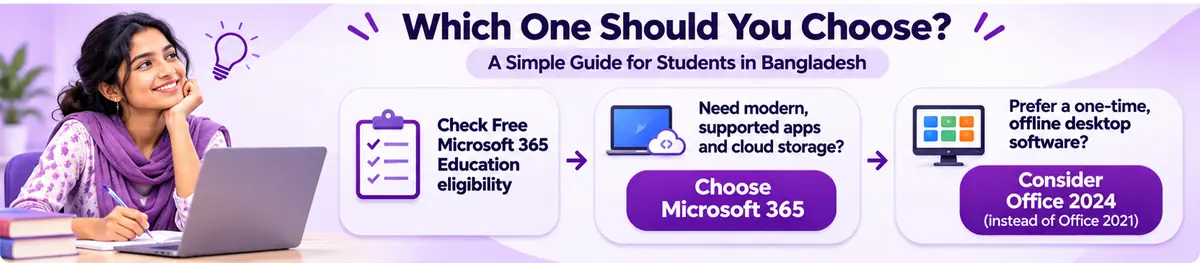
Image: Start with free education eligibility, then choose a supported plan based on your work.
A Simple Buying Checklist Before Paying for Microsoft Office in BD
Before you pay for Microsoft 365 or a one-time Office license in Bangladesh, check these questions:
- Is the software supported? Office 2021 is no longer supported as of October 13, 2026.
- Whose account is it? Your personal Microsoft account, a school account, or a ready-made login from a reseller?
- What apps are included? Browser-only apps or full desktop Word, Excel and PowerPoint?
- How much storage is available? Is 1 TB OneDrive part of that exact package?
- Can you reinstall or transfer the license? Ask about license terms rather than assuming every key can be reused.
- Can you use your own email? Ask whether a Family invitation can later be removed by the subscription organiser.
- What happens at expiry? Check renewal steps, your documents, OneDrive limits and the applicable warranty.
- Does it work with your computer? Check Windows/macOS support, RAM, available storage and installation requirements.
Avoid cracked Office installers and unknown activation scripts. They can create licensing and security problems, which is especially risky if your laptop contains personal documents or academic work.
How to Buy Microsoft 365 in Bangladesh with bKash or Nagad
If you have checked your free education options and still need a paid package, you can review Tech Haat’s current offers.
- Visit the Microsoft 365 subscription page.
- Select the account or activation type you actually want—not just the cheapest variation.
- Read the subscription duration, OneDrive details, warranty and account-access rules.
- At checkout, select an available payment method such as bKash, Nagad or Rocket.
- Keep the order receipt and follow the official activation instructions provided for your package.
- Open Word or Excel, check File → Account, and verify the active subscription and expiry information.
Tech Haat states that digital orders are delivered by email within 1–12 hours during office hours. Confirm the expected delivery time if you have an urgent assignment deadline.
You can also explore the Microsoft software category or compare the Microsoft 365 Family package if you are choosing for a household.
Microsoft 365 or Office 2024: A Better Comparison for New Buyers
Because Office 2021 is now unsupported, the more practical comparison for someone buying software in November 2026 is Microsoft 365 vs Office 2024.
Choose Microsoft 365 if you want an ongoing subscription with current features, cloud storage on an eligible plan and use across supported devices.
Consider Office 2024 if you need classic desktop apps on one computer, prefer a one-time purchase and do not need subscription cloud benefits. Microsoft lists support for Office 2024 until October 2029.
The right option depends on your needs. There is no reason to buy an old unsupported edition just because its price is lower.
Frequently Asked Questions
1. Is Microsoft 365 better than Office 2021 for students in Bangladesh?
Yes, for most students in 2026. Microsoft 365 offers supported, updated apps and eligible cloud features, while Office 2021 support ended on October 13, 2026.
2. Has Microsoft Office 2021 support ended?
Yes. Microsoft ended Office 2021 support on October 13, 2026. Its apps may still run, but Microsoft no longer provides security updates or regular technical support.
3. Can students in Bangladesh get Microsoft 365 for free?
Some can. Students with an eligible education email through a qualifying institution can access free Office 365 Education A1 web apps. Other users can try Microsoft’s free personal web apps.
4. What is the Microsoft 365 price in Bangladesh?
Tech Haat’s current Microsoft 365 product page shows a range of ৳550–৳1,800 for its available variations. These are reseller prices, and you should confirm the exact account type and checkout amount.
5. Does Microsoft 365 include 1 TB OneDrive storage?
An eligible Microsoft 365 Personal or Family subscription normally includes 1 TB OneDrive per user. Confirm that benefit on the specific package you choose, especially for third-party or education-managed accounts.
6. Can I use Microsoft 365 offline?
Yes. Installed Microsoft 365 desktop apps can work offline after activation, although periodic internet access is required for subscription checks and updates.
7. Is Office 2021 a lifetime purchase?
Office 2021 was sold as a one-time purchase for its licensed edition, but that does not mean lifetime security updates. Its support ended in October 2026, and license rights depend on the exact edition and seller.
8. Can I buy Microsoft 365 with bKash or Nagad?
Tech Haat lists bKash, Nagad and Rocket as local checkout options for its Microsoft 365 subscriptions. Check availability when placing the order.
9. Should I buy a ready-made Microsoft 365 EDU account?
First check your own institution’s education eligibility. For a reseller-provided EDU account, verify who administers it, whether its use is authorised and what happens to your data if access ends.
10. Should students buy Office 2024 instead of Office 2021?
For a new one-time purchase in 2026, Office 2024 is the more sensible option because it remains supported until October 2029, whereas Office 2021 is already out of support.
Final Verdict: Which Should Bangladeshi Students Choose?
Choose Microsoft 365 if you need Word, Excel and PowerPoint for regular assignments, teamwork and current security updates. Check whether your school provides a free education plan first. If you want a one-time desktop purchase, compare a supported Office 2024 edition rather than buying Office 2021 today.
For students buying through a reseller, check the account ownership, storage arrangements, device limits and renewal rules as carefully as the price. The lowest-cost offer is not necessarily the best choice for coursework you cannot afford to lose.
Explore Microsoft 365 at Tech Haat or read Tech Haat’s Microsoft 365 Bangladesh pricing guide for additional package information.


